How Property Managers Improve Security, Control, and Operational Efficiency
Mid-sized commercial buildings face a practical challenge.
Multiple tenants, rotating contractors, shared spaces, and internal restricted areas create constant access changes. Managing physical keys or access cards across this environment increases cost and risk.
Mobile credentials shift access control from physical distribution to digital management.
Why Traditional Keys and Cards Create Risk
Mechanical keys seem simple. In commercial settings, they create long-term liability.
Common issues include:
- Lost keys that cannot be tracked
- Rekeying costs when tenants change
- Unreturned credentials after employee turnover
- No visibility into who accessed interior spaces
Access cards improve tracking but still require printing, distribution, and replacement. They can also be shared between users.
For property managers, this means recurring administrative work and limited internal visibility.
Mobile credentials address these structural weaknesses.
What Is a Mobile Credential
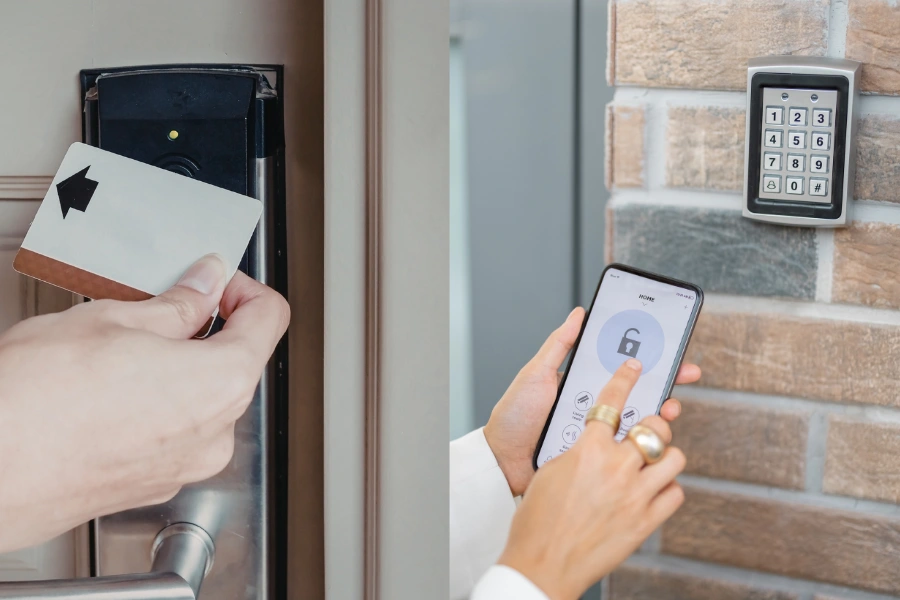
A mobile credential is a secure digital key stored on a user’s smartphone.
It uses encrypted Bluetooth Low Energy or NFC communication to unlock compatible doors. Permissions are issued through a cloud based management platform.
Unlike physical keys, mobile credentials are:
- Device-bound
- Encrypted
- Remotely managed
- Instantly revocable
Access becomes programmable. Control becomes centralized.
How Mobile Credentials Work in Multi-Tenant Buildings
The system operates through a clear workflow.
- A property manager assigns permissions in a cloud based portal
- The encrypted credential is delivered to the user’s device
- The user approaches the door
- The system verifies permissions
- The entry event is recorded in audit logs
If a tenant employee leaves, access can be revoked in seconds. There is no need to retrieve keys or replace hardware.
For buildings with frequent tenant turnover, this reduces transition friction and liability exposure.
Why Property Managers Are Moving to Mobile Credentials
Control Who Enters Which Areas
Commercial buildings require layered permissions.
For example:
- A law firm tenant accesses only its leased floor
- Cleaning staff enter offices only between 7 p.m. and 10 p.m.
- IT contractors access server rooms for scheduled maintenance
- Property managers retain master-level oversight
Mobile credentials allow access rules to be set by:
- Individual
- Group
- Time window
- Door location
This improves operational clarity while preventing unnecessary exposure.
Revoke Access Instantly and Reduce Liability
In traditional systems, revoking access may require collecting cards or rekeying cylinders.
Mobile credentials eliminate that delay.
When access is removed in the platform:
- The credential becomes inactive immediately
- The device can no longer unlock doors
- All activity remains documented in audit logs
For small office buildings or shared workspaces, this prevents security gaps during staff transitions.
Secure Interior Spaces Without Rewiring
Many commercial properties secure perimeter entrances but leave interior rooms mechanically locked.
Running new wiring to:
- Conference rooms
- Storage closets
- Financial offices
- Data cabinets
can be expensive and disruptive.
Wireless battery-powered locks that support mobile credentials allow interior expansion without infrastructure overhaul.
This enables scalable access control across the entire building, not just the front door.
Reduce Daily Administrative Work
Access management consumes time.
Property managers often coordinate:
- Card printing
- Locksmith visits
- Physical distribution
- Manual tracking spreadsheets
Mobile credentials reduce this workload.
New tenants can receive credentials remotely. Temporary contractors can receive time-limited permissions. Access expires automatically.
This improves operational efficiency and reduces recurring overhead.
Mobile Credentials vs Keys and Card
| Credential Type | Security Risk | Administrative Effort | Audit Visibility |
|---|---|---|---|
| Mechanical Keys | High | High | None |
| Access Cards | Moderate | Moderate | Partial |
| Mobile Credentials | Low | Low | Full |
Mechanical keys cannot generate audit logs.
Cards can be deactivated but are easily misplaced or shared.
Mobile credentials provide encrypted authentication, centralized permissions, and complete event history.
What to Look for in a Secure Mobile Credential System
Not all systems provide commercial-grade security.
Property managers should evaluate:
- AES-level encryption
- Secure key management protocols
- Multi-factor authentication support
- Compatibility with existing hardware
- Compliance with recognized lock standards such as EN1303
- Battery performance and maintenance planning
- API capability for integration with property management software
A mobile credential platform must combine digital flexibility with certified mechanical reliability.
Combine Mechanical Strength with Digital Control
Digital credentials manage permissions. Mechanical components enforce security.
In commercial environments, hardware remains the foundation of trust.
Certified lock cylinders ensure:
- Physical resistance against forced entry
- Durability under high-traffic conditions
- Compliance with European and international standards
Mobile credentials expand control. Certified mechanical engineering ensures structural integrity.
The strongest commercial systems combine both.
When Is the Right Time to Upgrade
Mobile credentials are particularly valuable when:
- Tenant turnover increases
- Interior security needs expand
- Insurance requires access logs
- Rekeying costs become recurring
- Administrative workload grows
The decision is not about adopting new technology for its own sake. It is about reducing operational friction while increasing control.
Build a Scalable Access Strategy
Commercial properties are evolving toward flexible leasing and shared space models.
Mobile credentials support:
- Remote management
- Scalable access control
- Real-time permission updates
- Centralized audit logs
- Reduced physical key dependency
For mid-sized buildings, this allows gradual modernization without replacing every door or rebuilding infrastructure.
Take Control of Your Building Access
Mobile credentials convert access control into a digital management process.
They improve visibility, reduce administrative burden, and allow secure expansion into interior spaces.
For property managers seeking greater oversight and scalable control, mobile credentials provide measurable operational benefits.
Reliable mobile credential systems depend on certified mechanical foundations. EOS SECURE delivers precision-engineered mechanical and electronic lock cylinders backed by more than a decade of manufacturing expertise. Established in 2011, our factory operates under ISO9001 and ISO14001 certifications, ensuring every product meets rigorous international standards including EN1303 and SKG. With over 50 advanced Swiss-type CNC automatic lathes and integrated machining centers, we manufacture high-quality lock cylinders trusted by clients across industries worldwide.
Whether upgrading existing doors with modular smart cylinders or deploying new access solutions, EOS SECURE provides durable hardware, consistent quality, and dependable technical support. Explore how EOS SECURE supports secure, scalable access control for commercial properties.