From isolated doors to a connected building
Many buildings treat smart locks and door controllers as a separate world.
The BMS runs HVAC, lighting, and energy, while access control runs on its own screens.
When you connect smart locks to the Building Management System, doors become part of the same picture as temperature, occupancy, and alarms.
Property teams gain one place to see how people use the building and how systems respond.
Main layers inside a typical BMS
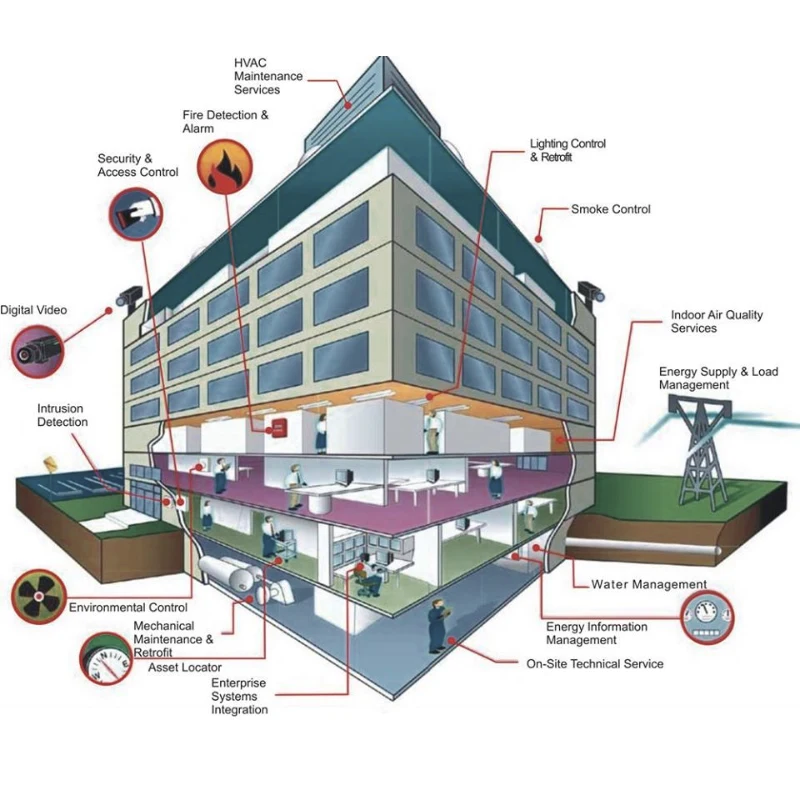
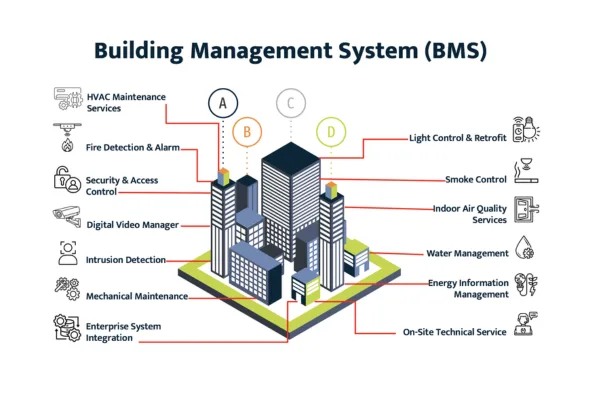
A BMS brings many building subsystems under one management layer.
Common examples include
- HVAC and air handling
- Lighting and blinds
- Power monitoring
- Fire interface and alarms
- Elevator and parking control
Most platforms use a three layer structure
- Field devices such as sensors and controllers
- Integration networks using standards like BACnet or Modbus
- Supervisory software for dashboards, trending, and alarms
Smart locks and access control do not replace any of this, they join it with focused information about how and when people move through doors.
Smart lock information that helps building operations
When you connect access control to BMS, you do not need every door event.
You need the events that change how the building should behave.
Useful data points include
- Entry and exit at main doors and car parks
- Door position on critical fire and smoke doors
- Forced open or held open states
- Lock and controller health for alarms and service
From a BMS view, these events drive actions such as switching floors on and off, adjusting night setback modes, or sending alerts to security staff.
Typical integration patterns between BMS and smart locks
There is no single way to connect access control with BMS.
Most projects fall into one of three patterns.
Event sharing over open protocols
The access control platform exposes key door events through BACnet, web services, or similar interfaces.
The BMS subscribes to those points and shows them as alarms, trends, or occupancy flags.
Examples
- A perimeter reader shows building occupied status
- Fire door status points appear on the same screen as fire alarm contacts
- Access alarms route through the BMS alarm workflow
High level integration through an enterprise layer
Large sites often run an integration server or middleware layer.
Access control and BMS both talk to this layer instead of each other directly.
Benefits
- One place to map users, areas, and schedules
- Cleaner security zoning between systems
- Easier future upgrades because each system only depends on the integration hub
Light touch linking through APIs
Some buildings use cloud based access control and modern BMS with REST or similar APIs.
In these projects, a focused integration sends only a few important signals.
For example
- After hours badge in triggers comfort mode on a single floor
- Security lock down commands flow from the BMS to defined access doors
This approach keeps both systems mostly independent while still sharing practical signals.
Rules, security, and division of responsibility
Smart lock data touches both comfort operations and physical security.
You need clear rules about who controls what.
Key points to define
- Which team owns cardholder and credential management
- Which team owns BMS schedules and modes
- Which alarms stay in access control only and which alarms appear in the BMS
Network security matters as well.
Limit which ports and services connect the two systems, and use encryption and authentication wherever possible.
For critical openings, smart locks should still make local decisions when networks fail.
BMS integration can enhance behavior, but door safety and code compliance should not depend on continuous network links.
Step by step roadmap to connect smart locks and BMS
A staged plan helps you reach integration without disrupting daily operations.
Assessment and mapping
Start by listing
- BMS vendor and version
- Access control platform and interfaces
- Doors and zones that matter most for energy and safety
Map which points you want to share, for example building occupied state, key alarm doors, and main lobbies.
Proof of concept on a small zone
Pick one floor or one building as a pilot.
Connect a limited set of door points to the BMS and build a simple dashboard.
Test real scenarios such as
- First badge in of the day
- After hours cleaning
- Forced open on a key door
Check that both systems show the same story and that alarms reach the right team.
Expansion and refinement
After a stable pilot, extend the model to more zones.
Refine rules based on feedback from security, maintenance, and tenants.
Add features carefully such as
- Occupancy based lighting and HVAC control
- Consolidated alarm handling for access, HVAC, and power
- Trend reports that combine door usage with energy and comfort metrics
Throughout the rollout, keep documentation current so future teams understand how the systems link together.
FAQ
What is the purpose of the BMS
A Building Management System coordinates core building functions such as HVAC, lighting, and energy use. It helps operators monitor performance, respond to alarms, and keep conditions stable and efficient. When access control links in, the BMS can also react to how and when people occupy the space.
What does BMS mean in buildings
In buildings, BMS means Building Management System. It refers to the hardware and software that supervises mechanical and electrical services. The system gathers data from field devices and gives facility teams central control and visibility.
What is the purpose of a BAS system
BAS usually stands for Building Automation System, a term that overlaps with BMS. It focuses on automating control based on schedules, sensors, and logic. The purpose is to keep comfort and safety within targets while reducing energy use and manual intervention.
What is the meaning of BMS
BMS means Building Management System, the integrated platform that connects and manages building services. It acts as the control center for systems such as HVAC, lighting, power monitoring, and sometimes security and access control.
What are the three types of BMS
People describe BMS types in different ways. A simple view separates stand alone systems for single buildings, networked systems that cover sites or campuses, and cloud connected platforms that support multi site portfolios. Each type offers different levels of scale, analytics, and remote access.
What happens if BMS fails
If a BMS fails, local controllers often keep basic functions running on their own schedules and set points. Operators lose central monitoring and adjustments until systems recover. For integrated access control and smart locks, critical doors should still follow local rules so safety and security remain intact during outages.
How does a BMS work in buildings
A BMS collects data from sensors and controllers, runs control logic, and sends commands back to field devices. It presents information through graphics, trends, and alarms so staff can understand conditions quickly. In integrated setups, it also receives selected events from smart locks and can trigger related building actions.
How much does a building management system cost
Costs vary widely based on building size, number of systems, and desired features. Small sites may use modest platforms with limited points, while large campuses invest in enterprise grade software, integration servers, and extensive field devices. A full budget should include design, commissioning, training, and ongoing support.
About EOS SECURE
EOS SECURE delivers precision engineered mechanical and electronic lock cylinders backed by more than a decade of manufacturing expertise. Established in 2011, our factory operates under ISO9001 and ISO14001 certifications, and our products meet rigorous international standards including EN1303 and SKG. With more than 50 advanced Swiss type CNC automatic lathes and integrated machining centers, we manufacture high quality cylinders and smart locking components that integrate smoothly with modern access control platforms and BMS driven projects worldwide. Whether you need cylinders for online doors, wireless locks, or hybrid mechanical electronic setups, EOS SECURE provides reliable performance, consistent quality, and dependable technical support. Secure your business with solutions built for long term stability, contact us today.