Why multi factor authentication matters for modern access control
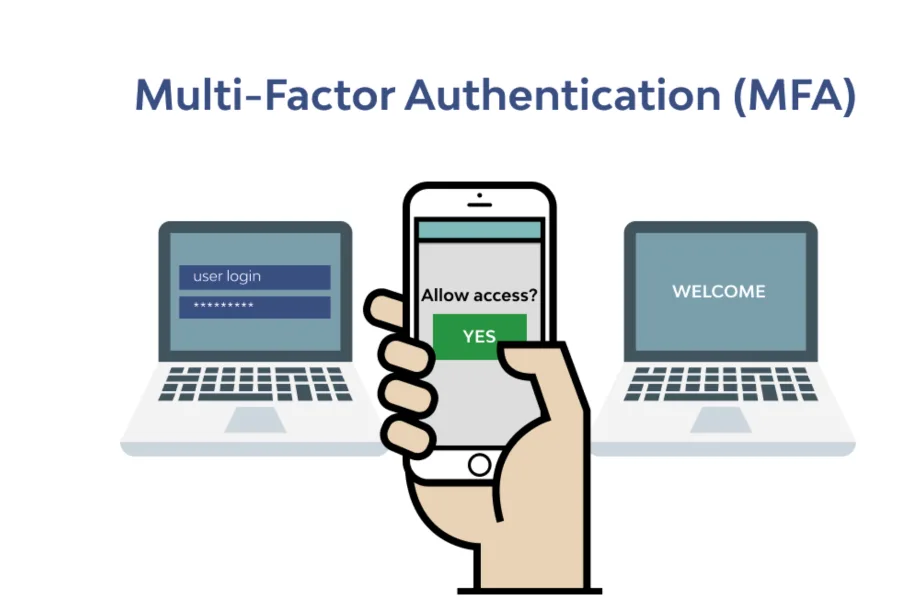
Multi factor authentication, often shortened to MFA, adds an extra layer of proof before someone gains access.
In IT systems it protects accounts, in physical security it protects doors and spaces.
When both work together, small businesses get tighter control over who enters and who signs in.
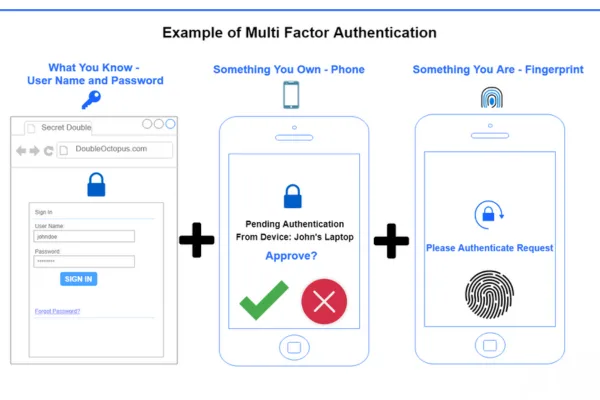
MFA asks users to prove identity with two or more factors such as
- Something they know, like a PIN
- Something they have, like a phone or key card
- Something they are, like a fingerprint
For smart locks and access control, MFA turns a door from a single check point into a combined digital and physical checkpoint.
Connecting IT security and smart door locks
Many small businesses already use MFA on email, banking, or cloud tools.
Doors often stay one step behind, still using single factor keys or basic keypads.
When MFA extends to smart locks
- The same identity that logs in to systems can open doors
- Access rights stay in sync across physical and digital spaces
- Security events create a unified audit trail, from login to entry
The result is one identity per person and one access policy across both networks and doors.
How MFA works in smart lock systems
In a smart lock or electronic cylinder, MFA usually combines at least two elements from this stack
- Mobile credential, an app or wallet pass on a phone
- PIN code on a keypad or reader
- Biometric factor such as fingerprint or face on a reader or mobile device
- Backup element such as a secure card or fob
A typical sequence for door entry
- The user presents a mobile credential at the reader
- The system prompts for a PIN on the keypad
- The controller verifies both factors against the cloud based access platform
- The door unlocks and the event logs with time, user, and door location
This mirrors IT MFA flows where users enter a password, then confirm a one time code or push notification.
Key business benefits of MFA enabled smart locks
Stronger protection for sensitive areas
Some spaces deserve more than a single factor
- Server rooms and network racks
- Cash handling areas and safes
- Pharmaceutical or high value storage
- R&D labs and data rooms
MFA makes it much harder for a stolen phone or shared PIN to work on its own.
An attacker would need multiple compromised factors at the same time.
Reduced risk from lost keys or shared codes
Physical keys often get copied or lost.
Keypad codes often get shared informally between staff.
With MFA and mobile credentials
- The business can revoke one factor in seconds from a cloud console
- Shared codes alone do not open doors
- Suspicious patterns appear in audit logs, like repeated PIN failures
This improves control without constant re keying or code changes.
Better alignment with compliance and audits
Many industries expect MFA for systems that hold sensitive data.
When physical access follows the same principle, audits become simpler.
MFA on doors supports
- Clear mapping between user identity and entry events
- Stronger proof of who accessed regulated areas
- Easier reporting with unified logs across IT and physical access
Practical use cases for small businesses
Retail shops and front of house
Retail teams change often, and keys circulate quickly.
MFA helps owners protect back office rooms or cash handling zones.
Example use
- Staff use mobile credentials at the staff entrance
- Managers enter a second PIN to access the safe room
- Temporary workers get time limited credentials that need a code after hours
Offices and co working spaces
Offices need flexible access for employees, contractors, and visitors.
MFA supports
- Higher assurance for executive offices or document rooms
- After hours entry that requires both phone and PIN
- Easy removal of access for former staff through remote management
Warehouses and light industrial sites
These sites often spread across large areas with multiple gates and loading zones.
With MFA
- Yard gates use card plus PIN for drivers and logistics partners
- High value cage areas use mobile plus biometric factor
- Supervisors monitor entry in real time and adjust rights without being on site
Designing the right MFA experience at the door
MFA increases security, yet it should not slow every user at every door.
The best designs match friction to risk.
Consider these principles
- Use single factor for low risk shared areas such as general office floors
- Use MFA for high risk or after hours scenarios
- Allow adaptive policies, for example extra factor when someone enters at unusual times
Policy examples
- During business hours, staff use their phone to open main doors
- After hours, the same door requires phone plus PIN
- Server room and high value rooms always require two factors
This keeps everyday movement smooth while protecting what matters most.
Implementation steps for MFA in smart lock projects
Small businesses can follow a clear path when adding MFA to access control.
1 Define zones and risk levels
Map your site into zones
- Public and reception areas
- Staff only areas
- High value or regulated areas
Assign which zones need single factor and which need MFA.
2 Choose compatible hardware and credentials
Confirm that locks, readers, and controllers support multiple factor flows.
Key points
- Support for mobile credentials and app based verification
- Keypad or biometric reader options where needed
- Secure connection to a cloud based management platform
3 Align IT and physical access policies
Work with whoever manages IT security.
Unify
- Identity sources such as directories or HR systems
- Naming and role structures for users
- Rules for onboarding and offboarding staff
When one user account controls both systems, changes occur once and apply across doors and applications.
4 Plan user onboarding and training
MFA only works well when people understand it.
Provide
- Simple step by step guides for enrolling mobile credentials
- Clear instructions on how to enter PINs or use biometrics at doors
- Support channels for lost phones or lockouts
Explain the reason behind MFA in business terms such as protecting cash, equipment, and data.
5 Monitor, review, and adjust policies
Use audit logs and reports to refine your settings.
Look for
- Repeated failed attempts at specific doors or times
- High friction points where people struggle with MFA
- Opportunities to tighten access in sensitive zones
Adjust factors, time windows, or user roles while keeping operations smooth.
Common challenges and how to address them
User resistance and perceived friction
Some users see MFA as extra hassle.
You can reduce this by
- Using phone based credentials that staff already carry
- Applying MFA only where risk is higher
- Communicating how MFA protects their own work and data
Device compatibility and connectivity
Not every user carries the same type of phone or always has a strong signal.
Plan for
- Backup methods such as cards or fobs plus PIN
- Offline capable locks that sync events when back online
- Clear fallback processes for door access during outages
Integration with existing systems
Many sites already use some form of access control.
To avoid disruption
- Choose solutions that support open protocols and standard credentials
- Phase MFA into selected doors first, then expand
- Coordinate updates between IT teams and facility managers
How MFA future proofs business security
Attackers increasingly target both digital accounts and physical spaces.
Single factor methods age quickly as threats evolve.
By adding MFA to smart locks
- Businesses gain stronger, layered defense at each entry point
- Identity based policies replace unmanaged keys and shared codes
- Access control becomes more scalable and ready for growth or new sites
MFA transforms the door from a simple lock into an intelligent part of your overall security posture.
FAQ
What is meant by multi factor authentication
Multi factor authentication means using two or more independent checks to verify identity before granting access. It usually combines something you know, something you have, or something you are. The goal is to make it much harder for attackers to break in with one stolen factor.
What are two examples of multifactor authentication
Common examples include a password plus a one time code from a mobile app, or a smart card plus a PIN for door access. In a smart lock environment, a user might tap a phone credential at the reader and then enter a PIN on the keypad to open the door.
What is the best example for multi factor authentication
A strong example is an employee logging in with a password, then approving a push notification on a registered phone. At a door, an equally strong example is a mobile credential plus fingerprint for entry to a server room. Both combine different factors that are hard to steal together.
How do I enable multi factor authentication
To enable MFA, start with your main systems such as email, cloud tools, and access control platform. Open the security or account settings, enroll your preferred second factor, and test with a small group of users. For smart locks, work with your provider to activate MFA policies on selected doors.
What is the main disadvantage of MFA
The main drawback is extra friction for users. MFA adds one more step to logins or door entry, which can slow people down if not designed well. Good planning focuses MFA on higher risk actions or areas and uses convenient factors such as mobile prompts to keep the impact low.
Can someone take your account if you have 2FA
Two factor authentication greatly reduces the chance of account takeover, yet no method is perfect. If someone steals both your password and your second factor, they may still break in. That is why you should protect your devices, never share codes, and review login alerts and activity logs.
How do I know if my MFA is enabled
You can usually see MFA status in the security settings of your account or management console. Signs include backup codes, registered devices, or a note that two step verification is on. In an access control system, administrators can see which users or doors require multiple factors.
How to set up MFA for the first time
Start by choosing a trusted authenticator method, such as a mobile app, hardware token, or SMS code as a minimum. Follow the setup wizard in your account or access control platform, scan any required QR codes, and store backup options. Test sign in or door entry a few times before rolling it out widely.
About EOS SECURE
EOS SECURE delivers precision engineered mechanical and electronic lock cylinders backed by more than a decade of manufacturing expertise. Established in 2011, our factory operates under ISO9001 and ISO14001 certifications, and our products meet rigorous international standards including EN1303 and SKG. With more than 50 advanced Swiss type CNC automatic lathes and integrated machining centers, we manufacture high quality lock cylinders trusted by commercial clients worldwide. Whether you need MFA ready electronic cylinders, small batch customization, or large scale production, EOS SECURE provides reliable performance, consistent quality, and dependable technical support. Secure your business with solutions built for long term stability, contact us today