Access control as the foundation of modern door security
When a business grows beyond one or two keys, door security turns into a management problem.
You need to know who can enter, which doors they can use, and when their access should stop.
An access control system brings those decisions into a single, structured platform.
It connects credentials, doors, and policies so owners gain control instead of chasing keys and ad hoc lock changes.
How an access control system fits together
Every access control setup follows the same basic pattern.
Someone presents a credential at a door, the system checks the rules, the door either unlocks or stays secure.
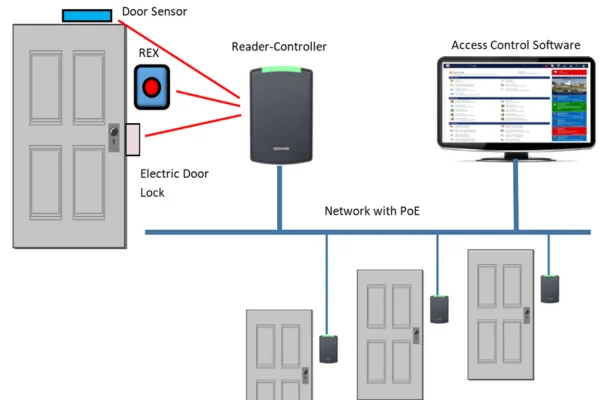
To support that flow, four building blocks work together.
Credentials
Credentials represent people in the system.
Common forms include
- Key cards and fobs
- Mobile credentials on phones and wearables
- PIN codes and one time passwords
- In some cases, biometrics such as fingerprints
Each credential links to a user profile and a set of permissions.
Readers and door hardware
Readers sit on or near the door and capture the credential input.
They can support cards, mobile devices, PIN pads, or a mix.
Behind the reader, hardware such as electronic cylinders, electric strikes, magnetic locks, or motorized locks physically control the door leaf.
The mechanical strength of that hardware decides how long the door holds under force.
Controllers and panels
Controllers act as the decision makers at the edge.
They receive data from readers, check credentials against stored rules, and trigger lock outputs.
Some smaller systems use integrated locks with built in controllers.
Larger sites often use distributed controllers that manage groups of doors and talk to a central server or cloud platform.
Management software
Software ties everything together.
Administrators use it to
- Create and remove user accounts
- Assign roles and access levels
- Define schedules and holiday rules
- Review audit logs and alarms
Cloud based platforms also support remote management, so teams can adjust access or view events across multiple locations.
Main access control models small businesses encounter
Different systems manage permissions in different ways.
Understanding these models helps you match technology to your organization.
Role based access
In role based access, the system groups users by job function.
Roles such as staff, manager, or contractor carry sets of door permissions.
When someone changes jobs, you update their role and the system updates their access everywhere.
This model suits most offices and retail environments.
Attribute based access
Attribute based access uses conditions such as time of day, location, or device state.
For example, a contractor might only open service doors during work hours, and only while their contract remains active.
This approach supports fine grained control in complex sites, yet it needs careful planning to stay clear and maintainable.
Mandatory and discretionary models
Some industries use mandatory access models where policy comes from strict rules, not from individual managers.
Others rely on discretionary models where resource owners decide who can enter their space.
Small businesses often use a blend, with core rules set centrally and some doors controlled by local managers.
Typical access control use cases
The same building blocks can support very different scenarios.
Single site retail or office
A small shop or office might start with a few doors, such as
- Front entrance
- Staff only back room
- Storage or server cabinet
Cards or mobile credentials replace shared keys.
Schedules restrict access to business hours plus setup or closing windows.
Multi tenant or multi site operations
Property managers and growing companies often handle many doors across several sites.
An access control system helps them
- Onboard and offboard people across locations
- Apply consistent rules for contractors and cleaning staff
- Separate tenant areas from shared infrastructure
Central management reduces duplicated work and keeps policies aligned with leases and service contracts.
Mixed mechanical and electronic security
Not every door needs a reader.
Many projects keep mechanical deadbolts or cylinders on low risk or rarely used doors, while moving perimeter and high traffic doors to electronic control.
A flexible system lets you choose where to deploy online readers, wireless locks, and electronic cylinders, without losing visibility and control.
How EOS SECURE fits into an access control stack
EOS SECURE focuses on the mechanical and electronic locking layer that sits right on the door.
That layer connects to controllers and software from many different access control platforms.
Key contributions include
- Precision engineered mechanical cylinders for high duty commercial doors
- Electronic cylinders that accept credentials such as key cards or mobile devices
- Components optimized for integration with readers, mortise cases, and deadbolt hardware
When the overall access control system decides to grant access, EOS SECURE hardware turns that decision into a smooth, reliable unlocking motion at the door.
Practical selection tips for small business access control
A clear decision process reduces cost and future rework.
Consider these steps
- Count your doors and group them by risk level
- Identify users and roles, including staff, visitors, and vendors
- Decide which credentials you prefer, such as cards, mobile, or both
- Choose software that matches your need for remote management and reporting
- Select door hardware that fits local codes and door construction
From there, you can design a phased rollout, starting with the doors that create the most pain today.
FAQ
What are the 4 types of access control
Four common access control types appear in security discussions. They include discretionary access control, mandatory access control, role based access control, and attribute based access control. In everyday business systems, role based and attribute based models appear most often because they align well with job functions and schedules.
What is an ACS system
An ACS system is an access control system that manages who can enter specific areas and when. It uses credentials, readers, controllers, and software to check permissions at each door. The system replaces unmanaged keys with centralized rules, real time changes, and detailed logs for security and operations.
What is an example of an access control
A very common example is a key card reader at an office entrance. Employees tap their cards, the reader sends data to a controller, and the controller checks whether that card can open the door. If rules allow entry, the lock releases and the system records the event in the log.
What is an access control security guard
An access control security guard supports the system by checking identities and enforcing entry rules. They might verify badges at a gate, monitor alarms from doors, and respond when the access control system flags unusual activity. Their role combines human judgment with the data and alerts from electronic controls.
What is the most common access control
In many commercial sites, role based access control is the most common approach. Administrators create roles that match job functions, such as staff or manager, then assign door permissions to those roles. Users inherit access from their roles, which makes changes easier when people join, move, or leave.
What are three types of ACL
In security, ACL often means access control list. Three common contexts include file system ACLs that manage read and write rights, network ACLs that filter traffic between segments, and application ACLs that control which users or groups can reach certain functions. Each list defines who can do what on a resource.
How does access control work
Access control systems follow a simple pattern. A user presents a credential, a reader sends data to a controller, the controller checks policy rules, and the door unlocks only if the rules allow it. Software manages users, schedules, and logs so administrators can adjust access and review activity over time.
Which is the best access control system
The best system matches your size, risk profile, and growth plan. Small businesses often benefit from cloud based platforms with mobile and card support, simple role based rules, and good reporting. Reliable door hardware and cylinders, clear onboarding workflows, and responsive support matter just as much as feature lists.
What are the 4 principles of access control
Four useful principles guide access control design. Least privilege means users only receive the access they need, separation of duties splits sensitive tasks across roles, accountability links actions to specific identities through logs, and regular review keeps permissions aligned with current jobs and business needs.
About EOS SECURE
EOS SECURE delivers precision engineered mechanical and electronic lock cylinders backed by more than a decade of manufacturing expertise. Established in 2011, our factory operates under ISO9001 and ISO14001 certifications, and our products meet rigorous international standards including EN1303 and SKG. With more than 50 advanced Swiss type CNC automatic lathes and integrated machining centers, we manufacture high quality cylinders and lock components that integrate smoothly into modern access control systems. Whether you need secure cylinders for online readers, wireless locks, or hybrid mechanical electronic setups, EOS SECURE provides reliable performance, consistent quality, and dependable technical support. Secure your business with solutions built for long term stability, contact us today.